Why?#
A few months ago, I shifted from Linux Mint to EndeavourOS because I wanted to learn more about Linux and try Arch, especially the AUR. While installing EndeavourOS, I picked Btrfs because I heard good things about it, like easy snapshots. So far, I had only dealt with ext4, so I thought, “Why not?” So I went with it, but completely forgot about swap.
Last week, I had Firefox and Brave with 30+ tabs opened in each, and multiple other stuff running in the background, which had taken more than 70% of the RAM, I presume. With all this running in the background, I launched Heroic Games Launcher and started Marvel’s Spider-Man Remastered, and my whole system froze. I tried pressing everything I knew, but nothing happened. Ultimately, I had to turn off the power supply and restart the PC to make sure everything works. Everything worked after the reboot.
At that moment, I realized I hadn’t set up a swapfile yet, which caused this issue. It’s been more than 2 months since I installed EndeavourOS and I didnt have any swap. To make sure this never happens again, I have now added swap file.
Steps#
Create a subvolume:
sudo btrfs subvolume create /swapCreate a swap file:
sudo btrfs filesystem mkswapfile --size 8g --uuid clear /swap/swapfileHow much swap?If you have 16GB RAM or more, 8GB is enough for most cases.
Otherwise just go with double the amount of RAM or same as RAM.
Modify the--size 8gto your preferred size.Activate the swap file:
sudo swapon /swap/swapfileNow, edit the
/etc/fstaband add this entry:/swap/swapfile none swap defaults 0 0
DONE!
Verify#
You can use any of the following to check whether the swap was created or not
swapon --showor
free -hIf you did everything correct, then the output should look like this: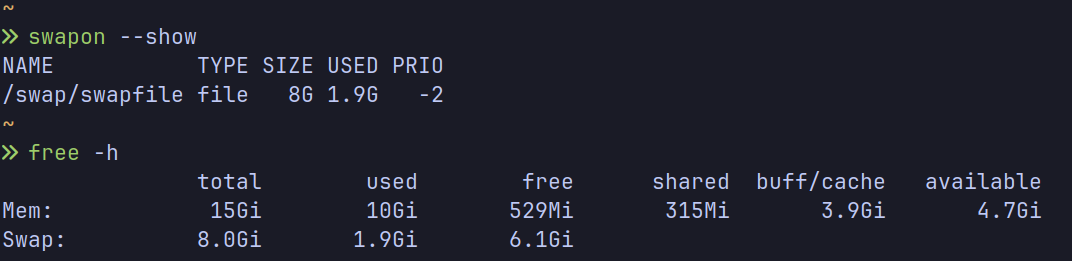
Conclusion#
This process was much simpler than I expected but if you want to dive deeper, you can always read the Arch Wiki.
I should’ve started with the Arch Wiki first but nope me being a 🤡, started with Claude then EndeavourOS Wiki then Claude then Arch Wiki. The solution was so straightforward that now I realize how much time I wasted when I could’ve gotten my solution easily. From now on, I will first search Arch Wiki then move on to something else.
Anyways, with these easy steps, the swapfile setup is done! Now I can easily open too many stuff at once again without worrying about any freezes or crashes. :)